Blog / Code

So You Want Small-caps, but Your Font Doesn’t Support Them

Have you wanted to typeset a Bible on screen or in print, but your preferred font doesn’t support small-caps (which is especially important for the Old Testament, where the small-caps Lord appears frequently in many translations)?

Well, if it’s a variable font, you can now try synthesizing small-caps with this quick Small-caps generator for variable fonts.

This tool tries to guess reasonable small-caps metrics for your font: it scales down the characters and increases the weight, width, and tracking to better approximate real small-caps.

Why not just use browser small-caps?

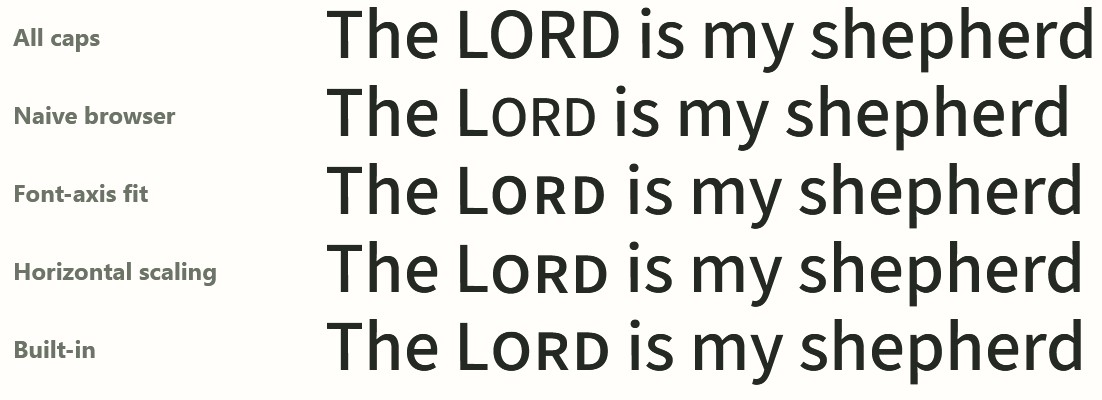
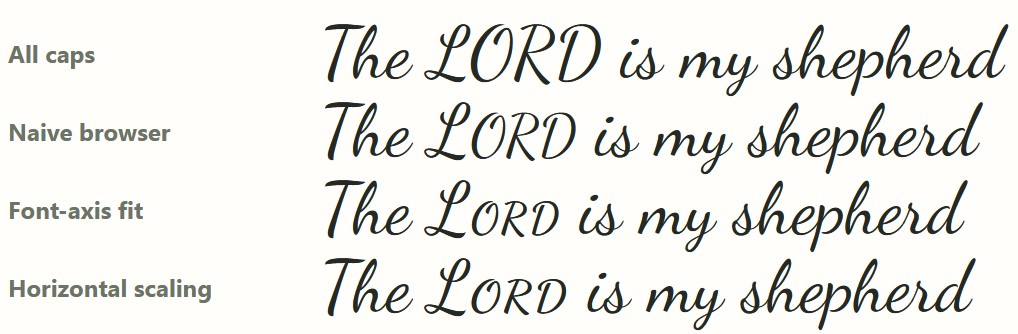
When true small-caps glyphs aren’t available, the regular CSS font-variant: small-caps declaration scales down the full-caps glyphs, leading them to appear lighter than the surrounding text. Take a look at the second line here (“Naive browser”), compared to the bottom line (the font’s built-in small-caps). This weight difference becomes especially annoying at large sizes or in running text. This example uses Source Sans.

Source Sans font shows all-caps, browser small-caps, font-axis fit, horizontal scaling, and built-in. The horizontal scaling closely matches the built-in small-caps.

How does the tool decide what to change?

The weight, width, and tracking it uses are based on an analysis of the top 500 fonts on Google Fonts, 51 of which have small-caps (smcp) support built into the font.

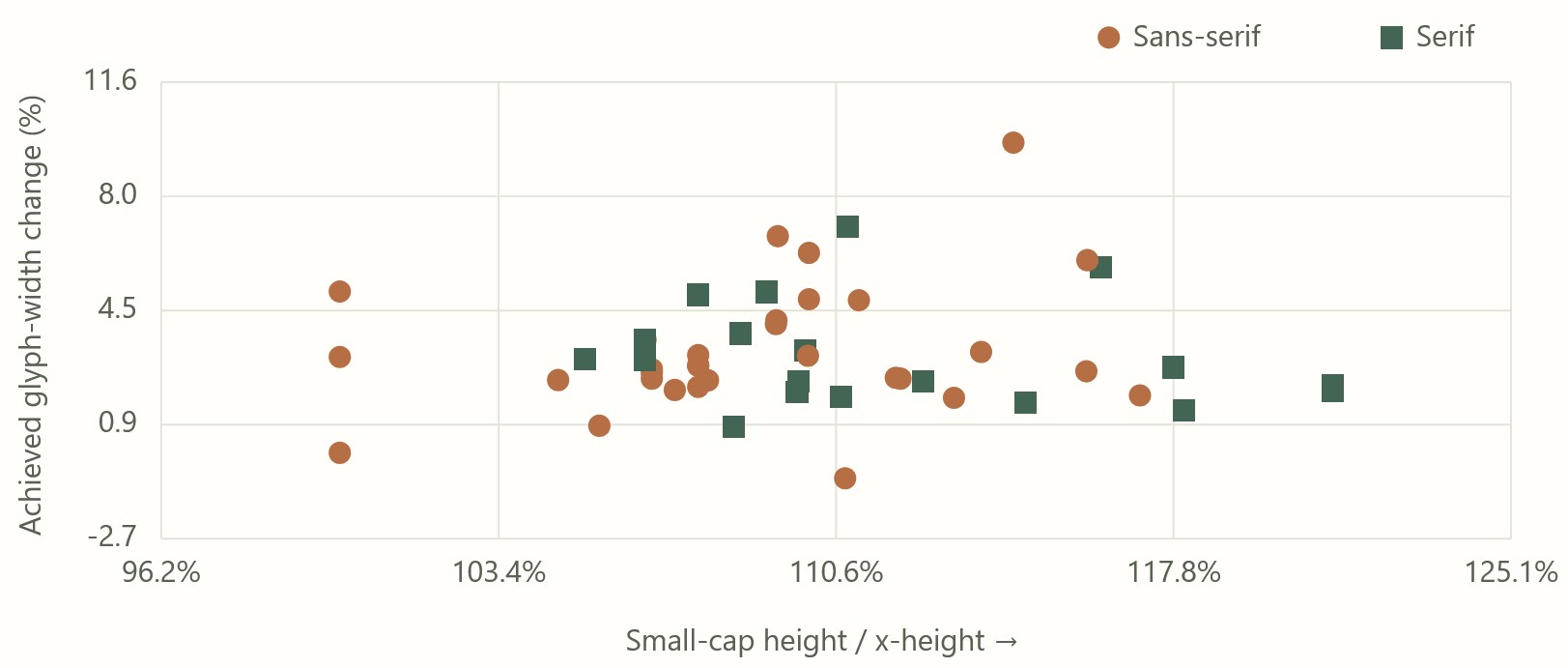
Here’s what that distribution looks like; there’s a decent amount of variability, but it also shows that your font’s small-caps will probably fall within a certain range of possible values.

The x-axis plots the small-caps height divided by x-height; the y-axis plots the glyph width change.
Native small-caps height plotted against native small-caps width, compared to default characters. This chart shows that font designers choose to vary height and width somewhat independently when designing small-caps, but still within a clear range.

For Google Fonts where small-caps are available from the Google Fonts repo, the tool uses precomputed values to match the built-in small-caps. It’s typically within 3% error, as described on the tool’s “Outlines” tab.

Why would you want synthetic small-caps?

In a web context, Google Fonts doesn’t supply the small-caps variants. Even if your font supports them, there’s no way to make them appear. This tool provides you the code you need to make them appear, by linking to the .otf rather than the optimized .woff2 (at the cost of a much larger font file).

To avoid the larger font file, the tool also supplies the CSS needed to synthesize small-caps that look as close as possible to native small-caps. If you only need a few words to be small-caps (as is generally the case when showing Bible text, unless you’re, say, NASB), you can download a recipe that applies to just the words you need, eliminating the need for another set of glyphs.

In a print context, if you’ve chosen a font that lacks small-caps support and want to be sure you have a reasonable output, this tool gives you metrics you can use to plug into your page layout software.

Does it work?

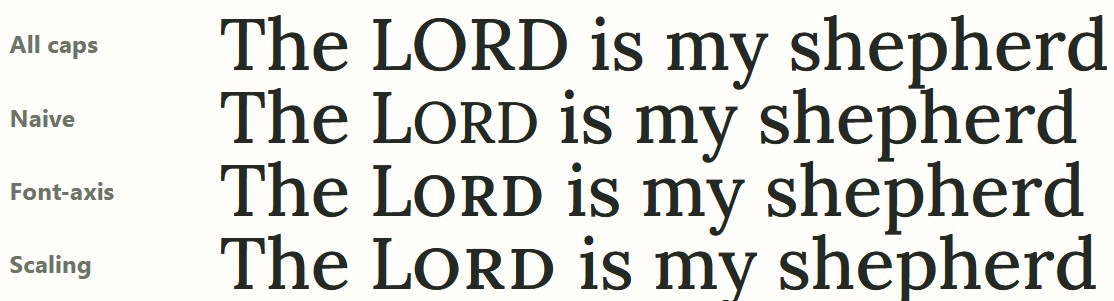
Usually it works fine… sometimes less so. Here the default 0.048em tracking for Lora feels too loose to me; it feels better at 0.03em, which also addresses some of the awkward kerning between “O” and “R” that you see below:

Lora has no small-caps, so the effect here is synthesized.

Sometimes the font itself (such as Dancing Script) doesn’t have enough weight variation. Even using a 400 base weight, the maximum 700 weight doesn’t fit with the lower-case letters.

Here the small-caps look too light compared to the lower-case letters.

With monospace fonts, the font scaling throws off the spacing. I wouldn’t use this tool for monospace fonts unless you don’t want the characters to line up… in which case, why are you using a monospace font?

Other features

If the generated small-caps don’t look quite right, you can adjust a bunch of sliders to get the look you want.

You can export the CSS (though you’ll probably need to adapt the markup to match your tagging system). There are also Typst and LuaLaTex exports (neither of which I tested). You can also share your settings or copy the url for your own later reference.

You can drag your own .woff2, .otf, or .ttf into the tool, and it’ll generate results for you. All the computation happens only in your browser; the main reason for hosting it on Github instead of on this site is to show that no server-side processing is happening. I don’t want your fonts.

Try it out

If you’re a typographic purist, you may be appalled at synthesizing small-caps at all. From a practical standpoint, though, these results are better than relying on scaling alone. I hope you find this tool useful next time you’re typesetting a Bible.

GPT-6 Astra wrote this tool under my guidance.

Try it online or access the source on Github; you can run it completely locally if you like.

Posted in Code, Typography

Building an Interlinear Apocrypha in two days for $50 with AI

Try the Interlinear Apocrypha.

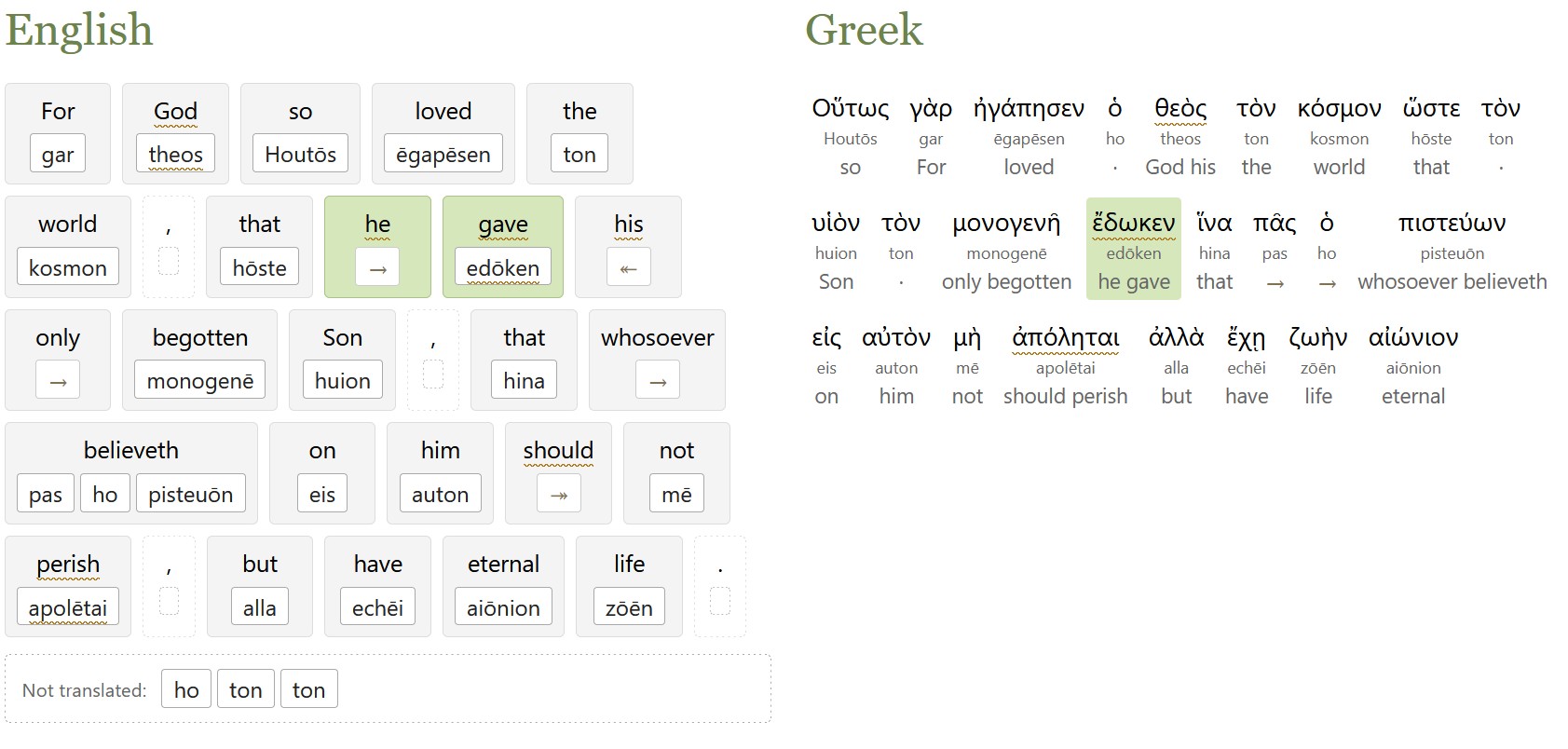
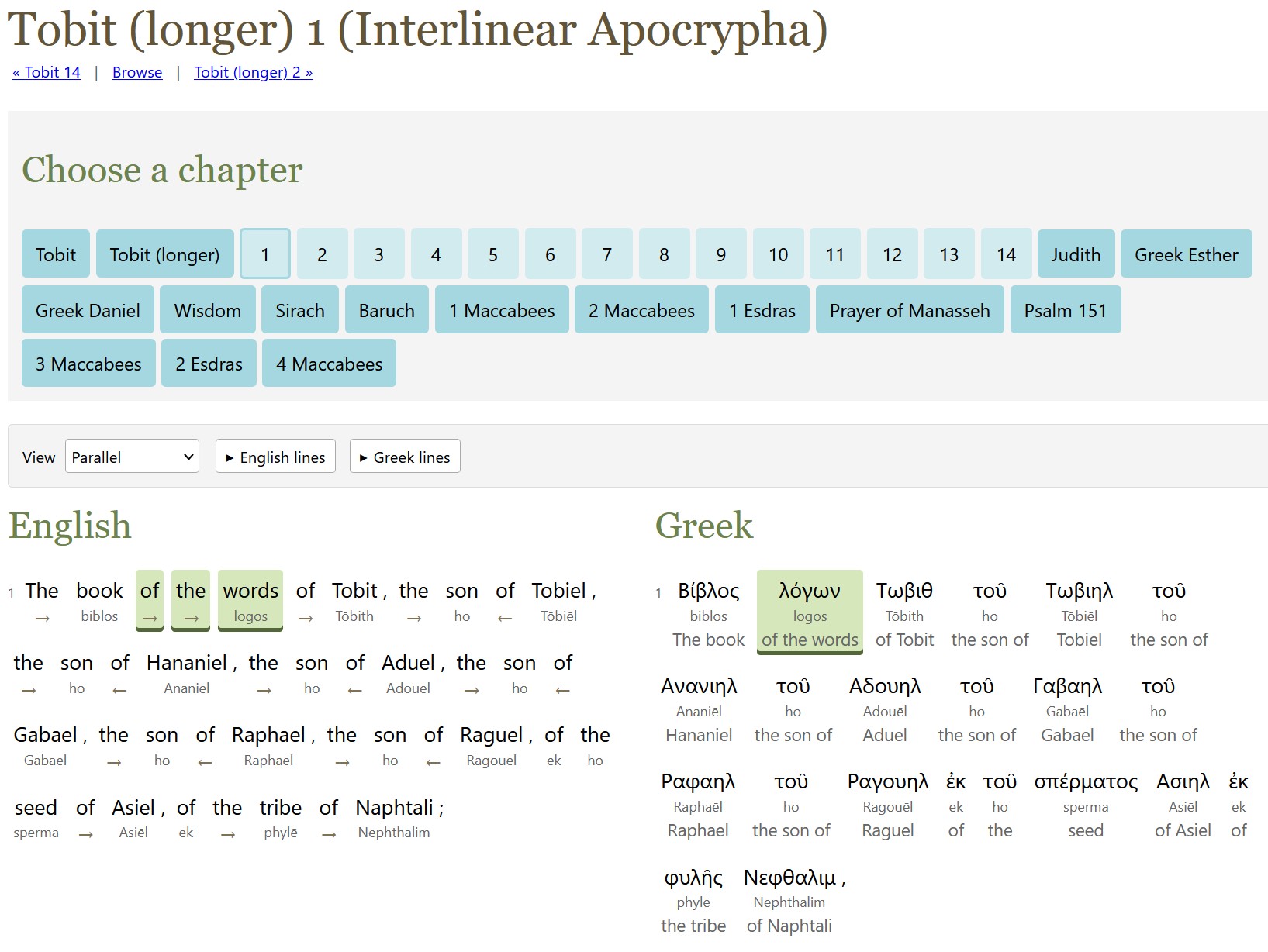
A screenshot of longer Tobit 1 in the interlinear shows highlighting between the English and the Greek.

The method to produce last week’s ASV interlinear also works for the Apocrypha (or Deuterocanonicals), which is mostly in Greek.

Unlike with the ASV alignment, this project doesn’t try to align alternate readings in the original languages; I didn’t think it was worth the processing time, though I did include the apparatus from the source texts.

The English translation is the World English Bible (WEB) because it has a translation of the Apocrypha and is freely available. (The ASV translators didn’t translate the Apocrypha.) The only exception is the longer Tobit (did you know there were two Tobits? I didn’t!), which uses D. C. Simpson’s 1913 translation because WEB only translates the shorter Tobit.

GPT-6 Astra did all the alignment work. It used a week’s worth of Pro 20x Plan tokens (thus the $50 cost). I later expanded the scope to transcribe the source apparatus (alternate manuscript readings, mostly), as described below, which cost another $15.

I used latinCy to generate the Latin parsing, with a review by Astra.

Here’s the output:

  1. The interlinear/reverse-interlinear interface, which lets you explore both English-first and original-language-first interfaces.
  2. A Git repo containing:
    1. The WEB English text tagged to the original languages (except for longer Tobit, which aligns Simpson rather than WEB).
    2. Greek and Latin text tagged to English. The versification here matches the originals rather than WEB. For example, Letter of Jeremiah is a separate book rather than WEB’s Baruch 6.
    3. Raw alignment data. As with ASV, these files are mostly the LLM talking to itself. I didn’t bother to include the scripts, which are substantially similar to the ASV ones.

Recreating the text of the Apocrypha

The Apocrypha text used is Rahlfs (1935), which the NRSVue translators say they used for most books. The Latin source text for 2 Esdras is from Bensly (1895).

While the main text was already digitized (mostly) correctly, I also decided to digitize the apparatus (which you can find in the USX files and in the original-language side of the HTML).

Here was my process for each page:

  1. GPT-6 Luna identifies the page regions in the page scans (header/footer vs. main text vs. apparatus). I ran three independent agents and took the union of the three.
  2. GPT-6 Sol transcribes the text. I used two agents for independent transcriptions. GPT-6 Luna wasn’t good enough to provide reliable transcriptions.
  3. GPT-6 Astra reconciles the Sol transcriptions and does any further work to finish the page.

It took about 30% of a week’s tokens on ChatGPT Pro 20x plan to parse around 550 pages, suggesting a potential processing rate of about 1,800 pages per week using this method. (This 30% was on top of the week’s tokens I spent on the alignment itself.)

Surprises

I asked GPT-6 Astra to reuse the ASV scripts, and I learned much later that it only sort-of complied. It missed a lot of details in adapting the scripts, which it had to reimplement later. My impression is that it rewrote these scripts from scratch instead of reusing what already existed.

About 92% of the Greek text (total words, not unique words) was able to have a Strong’s number assigned to it, thanks to TBESG. It probably could have found more, but it was spending a lot of tokens for diminishing returns.

Posted in AI, Code

Building an Interlinear for the ASV Bible in six weeks for $300 with AI

Try the ASV interlinear.

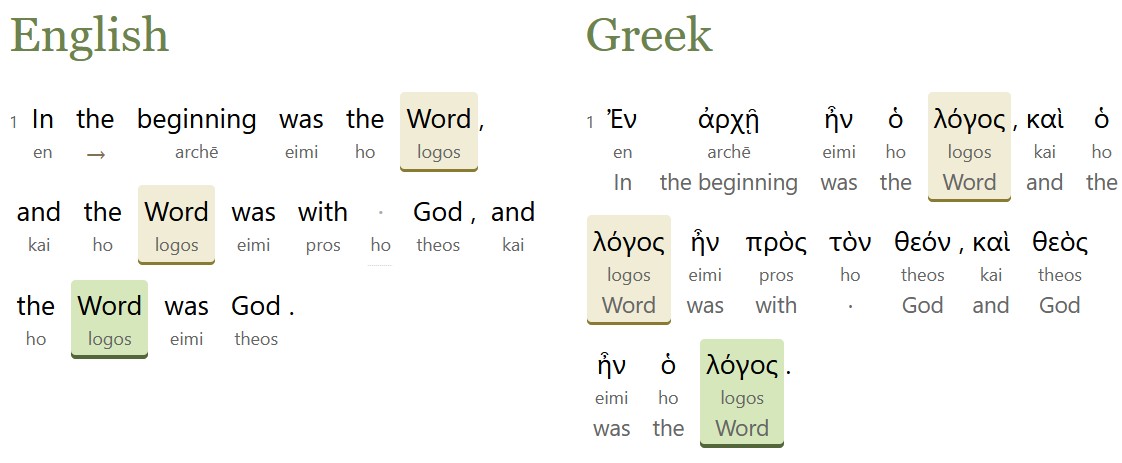
A screenshot of John 1 in the interlinear shows highlighting between the English and the Greek.

AI models are now smart enough to align English Bible translations with the original Hebrew and Greek, so why not make an alignment?

Starting with the English text of the American Standard Version (ASV) Bible from 1901, which is in the public domain, Opus 5, GPT 5.6 Sol, and GPT 6 Astra created an interlinear alignment, matching up the Hebrew and Greek original with the ASV’s modern(ish) English.

Here’s what they produced:

  1. The interlinear interface, which lets you explore both English-first and original-language-first interfaces. It also lets you see where the ASV departs from the KJV’s underlying text (155 verses).
  2. An ASV English text tagged to the original languages.
  3. A Hebrew and Greek text tagged to the ASV English. This text hypothetically reconstructs the eclectic text used by the ASV translators; textual variants that appear to have been chosen by the translators serve as the main text.
  4. Data and scripts that let you adapt this alignment process to your own text. If nothing else, the hard-won alignment rules, which went through hundreds of revisions over the course of this project and which cover all the tricky situations encountered during it, can serve as the starting point for your own alignment. LLMs love to talk about what they’re doing, and this repo records alignment reasoning down to individual verses.

Maximalist alignment philosophy

Perhaps most controversially, this project adopts a maximalist alignment philosophy, where it tries to align as much as possible, including italicized words that the ASV translators indicated as added. There are 6,250 such italic words in the ASV:

  • 3,303 are tagged as “added,” consistent with the ASV translators’ view.
  • 2,584 are tagged as part of a phrase with a different headword (the most-important word in a phrase).
  • 363 are tagged as headwords. For example, “those lands” in Judges 11:13 is translating the Hebrew pronoun for those. This alignment puts the phrase head on “lands” because it’s the most distinctive part of the phrase.

Process

Each chapter went through a three-step process:

  1. Align. The AI preps the data and does a first-pass alignment for each verse. It’s provided the alignment rules and the source text.
  2. Review. The AI looks at each verse and assesses whether the alignment is correct.
  3. Reconcile. The AI takes a larger view of the chapter, identifying inconsistencies or common themes and deciding whether to create new rules based on what it learned during this chapter.

Each chapter took about 40-60 minutes to run. Psalm 119 (the longest chapter in the Bible) took 90 minutes.

Managing cost

The hardest part of this project was managing token budgets. At first, I was parsing individual verses, which is the best way to achieve isolated alignments and reviews. But this approach exhausted my token quotas too quickly. So I switched instead to handling a full chapter at a time, which seemed to be the best balance of cost and performance.

Using this process, Claude Max or ChatGPT Pro 20x plan can process about 200-300 chapters per week before exhausting quota. ChatGPT is about 50% more efficient than Claude in terms of the number of chapters it can process per week. It took six quota-weeks to process these chapters, which is how I arrived at a $300 cost. (Traditionally, an interlinear would cost $50,000-$100,000 to produce.)

The token list prices are much higher than what I paid:

Step List Price
Align $2,300
Review $1,900
Reconcile $3,600
Total $7,800

So a 20x plan netted a 96% token discount off list prices.

I spent 100 million input tokens, 120 million output tokens, and 2.1 billion cached input tokens. With cache writes and some additional processing, the total token usage was about 2.5 billion tokens.

I also tried DeepSeek v4 and GLM 5.3, neither of which produced good results. Gemini 3.7 Flash produced fine results on alignment, but its batch API didn’t support structured outputs, which made it useless for this purpose.

Sources

This project worked from several open datasets:

  • SBLGNT, which served as the base Greek text. The variant readings in its footnotes supported 340 verses (out of just under 8,000 in the New Testament) where the ASV translators departed from the SBLGNT’s critical text (in part because the critical text is modern, while the ASV dates from 1901).
  • MACULA Hebrew and Greek for parsing data.
  • OSHB for the WLC text and verse-number differences between the Hebrew and the ASV.

I’m aware of two existing ASV alignments: Logos (2020) and STEP Bible by Wade Masfield (2013). I validated two chapters against the STEP alignment and one chapter against an NASB alignment to confirm that the AI output was sane, but I didn’t consult existing copyrighted alignments beyond these validation chapters.

Surprises

This project used an open human alignment as a gold standard. However, this data only altered two word-level alignments in the entire Bible. It added a lot of overhead to the process, since the AI mostly talked about how it disagreed with the reference because of differences in alignment philosophy. It turned out to be wasted overhead. The English glosses attached to the Hebrew and Greek mitigate this finding somewhat.

Far and away, this finding was the most-surprising part of the whole process for me: models are smart enough to do the alignment on their own, and a gold-standard, existing alignment reference is just a distraction to them, at least for this workflow.

Posted in AI, Code

Blending Herod’s Temple

I recently wrote about using Opus 5 to create a 3D model of Herod’s Temple. Now GPT-6 Astra is out, and OpenAI is trumpeting how well it uses Blender. They’re right.

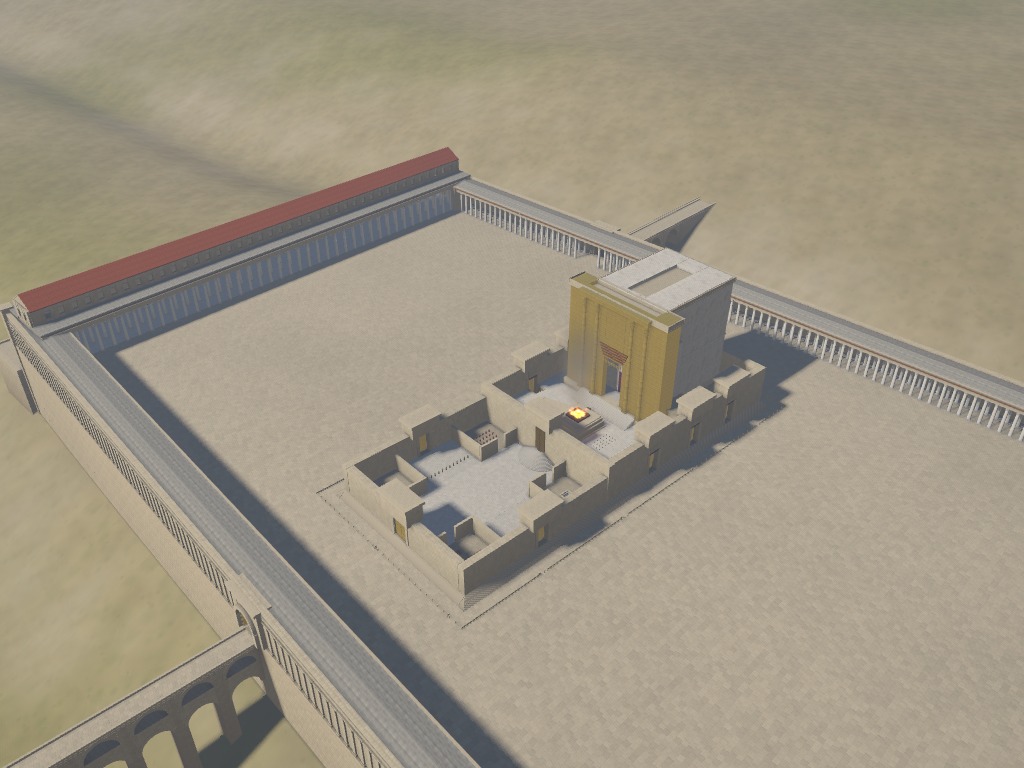
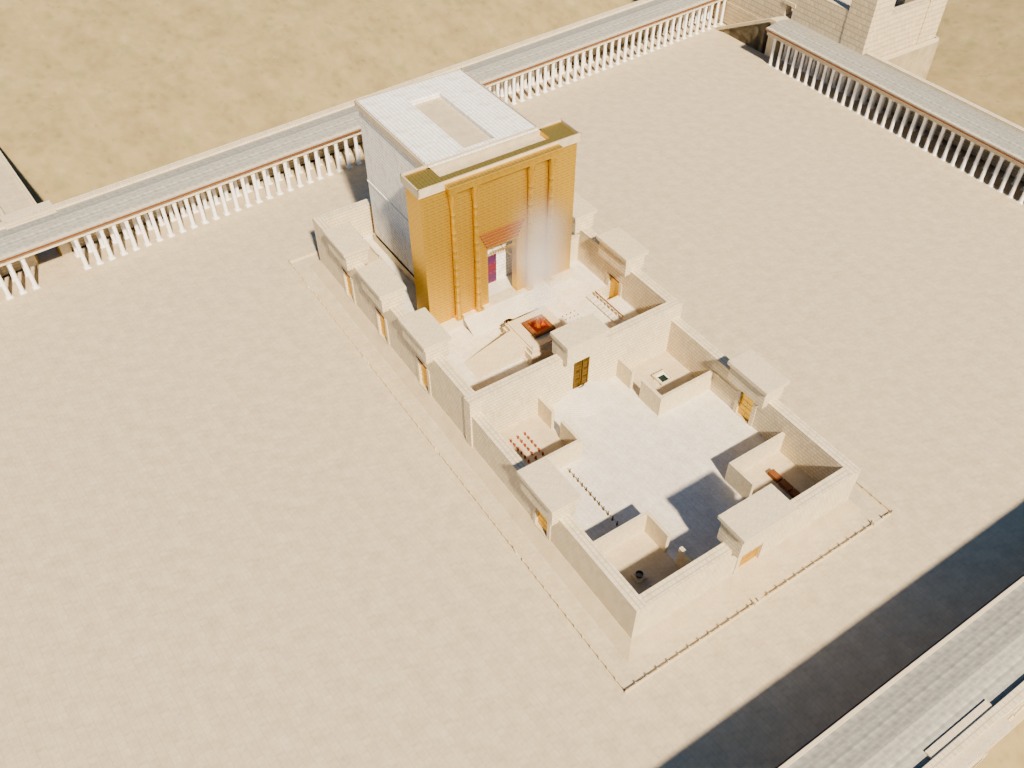
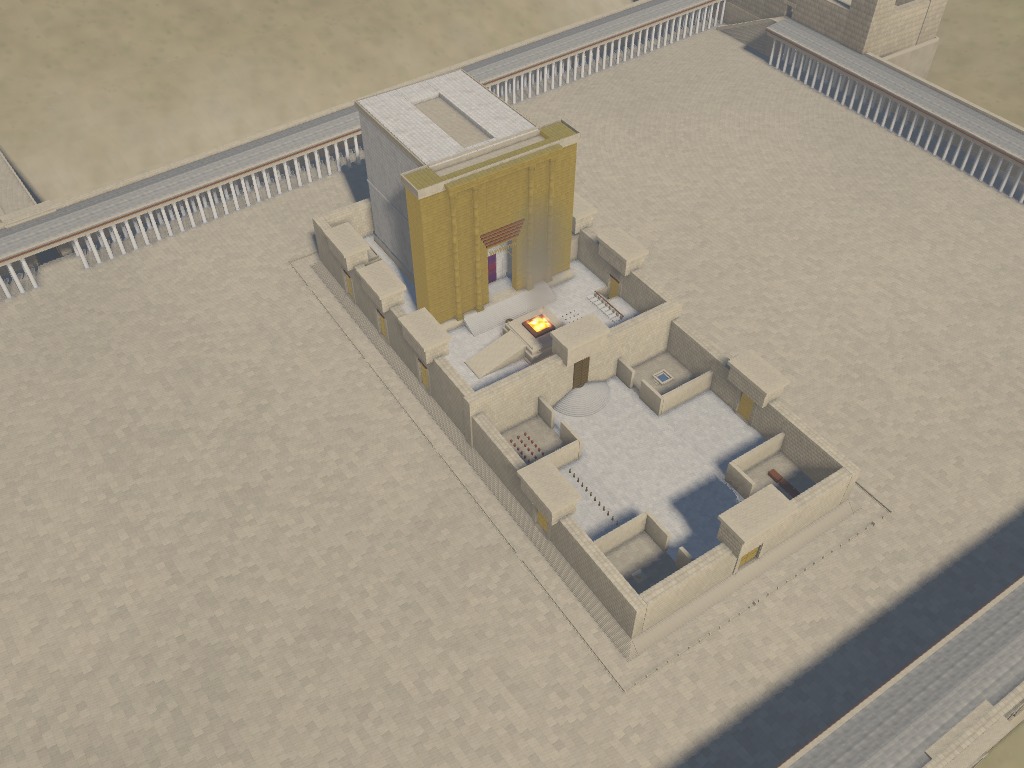
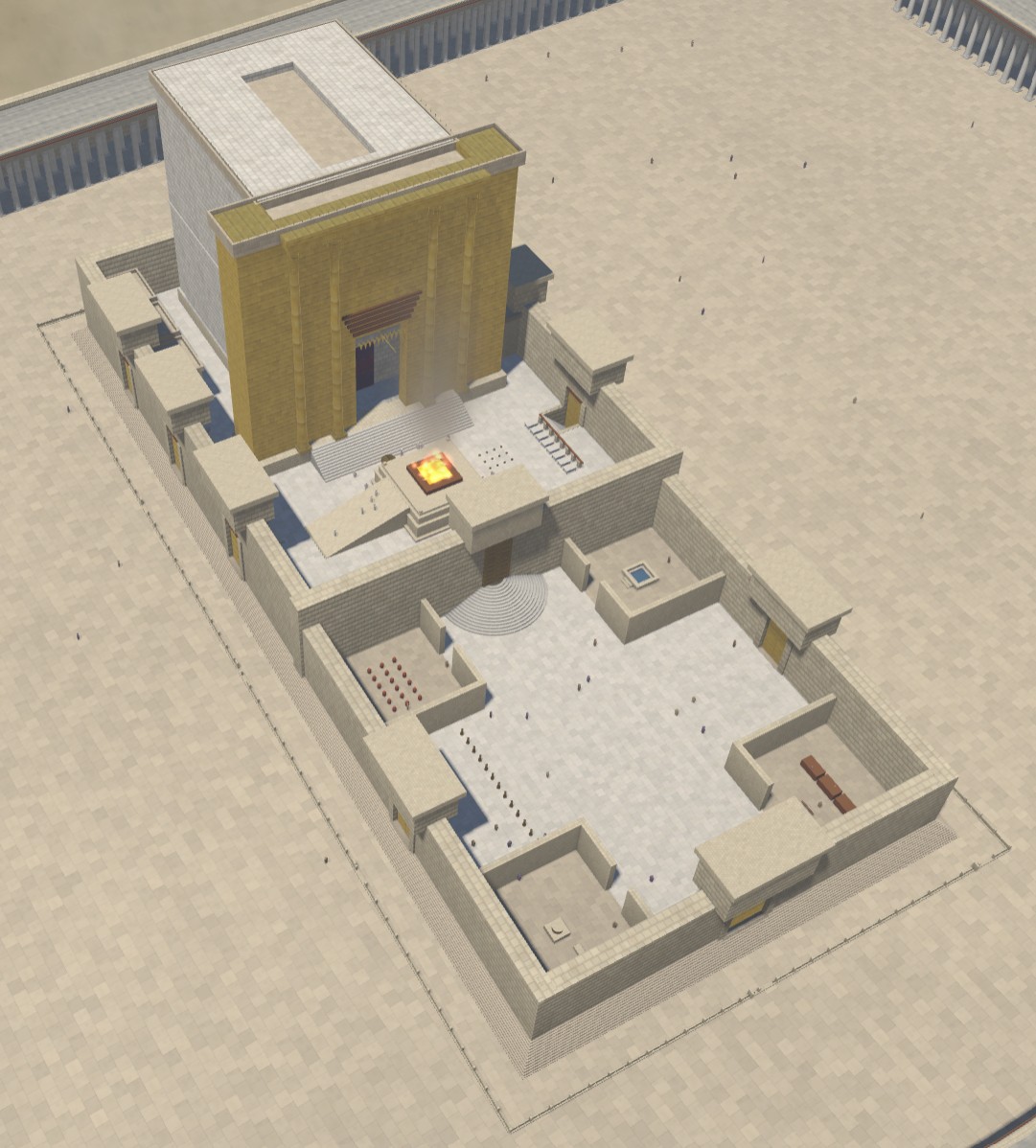
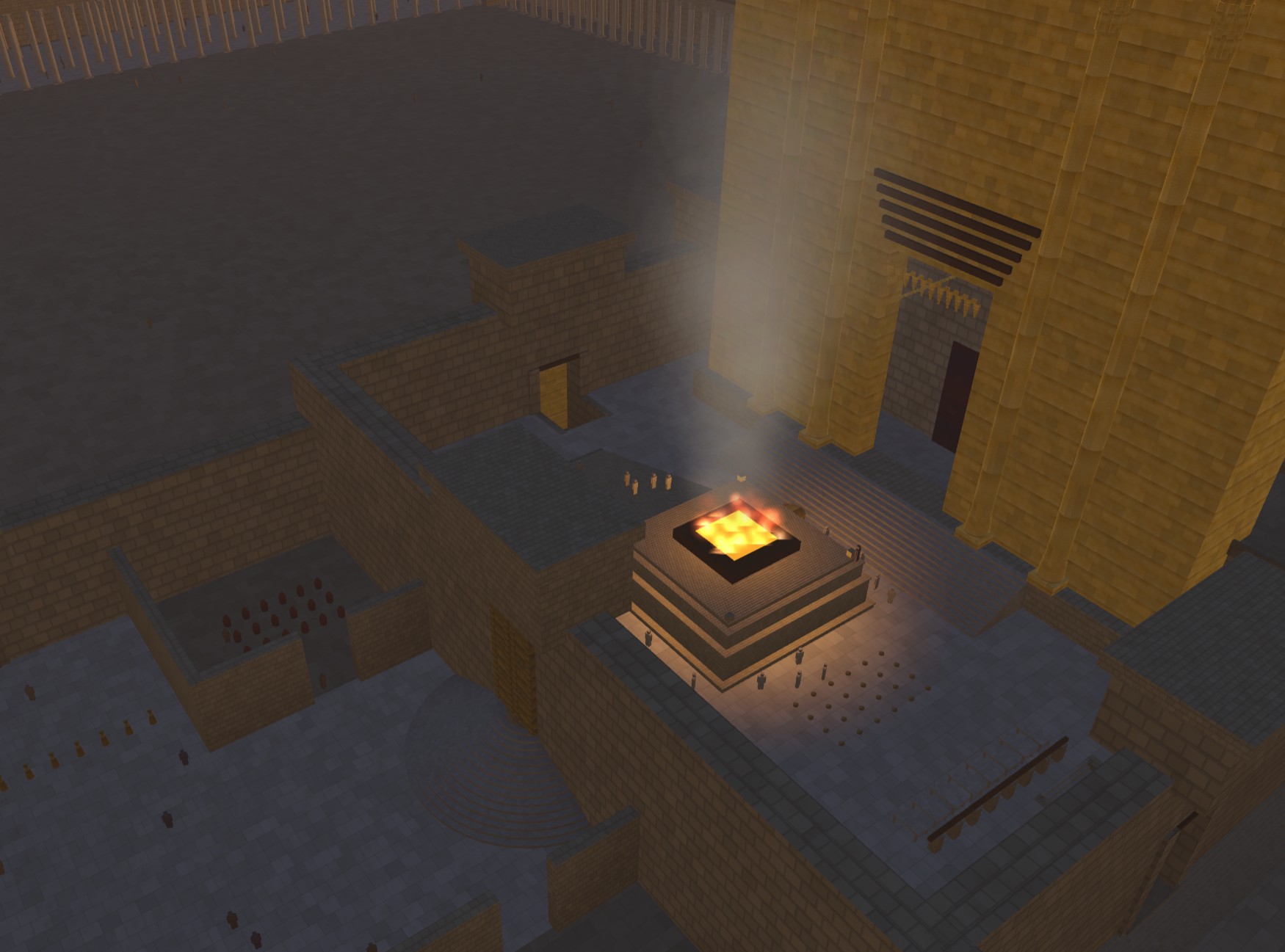
Below are some views of the Herod’s Temple model that compare the Blender version from today with the HTML version from July.

I also updated the code on Github and uploaded the model to Sketchfab so that you can use your own AI to make changes. Or maybe you have actual 3D-modeling skills and just want a starting place. In any case, feel free to use them however you want; AI-generated content isn’t copyrightable.

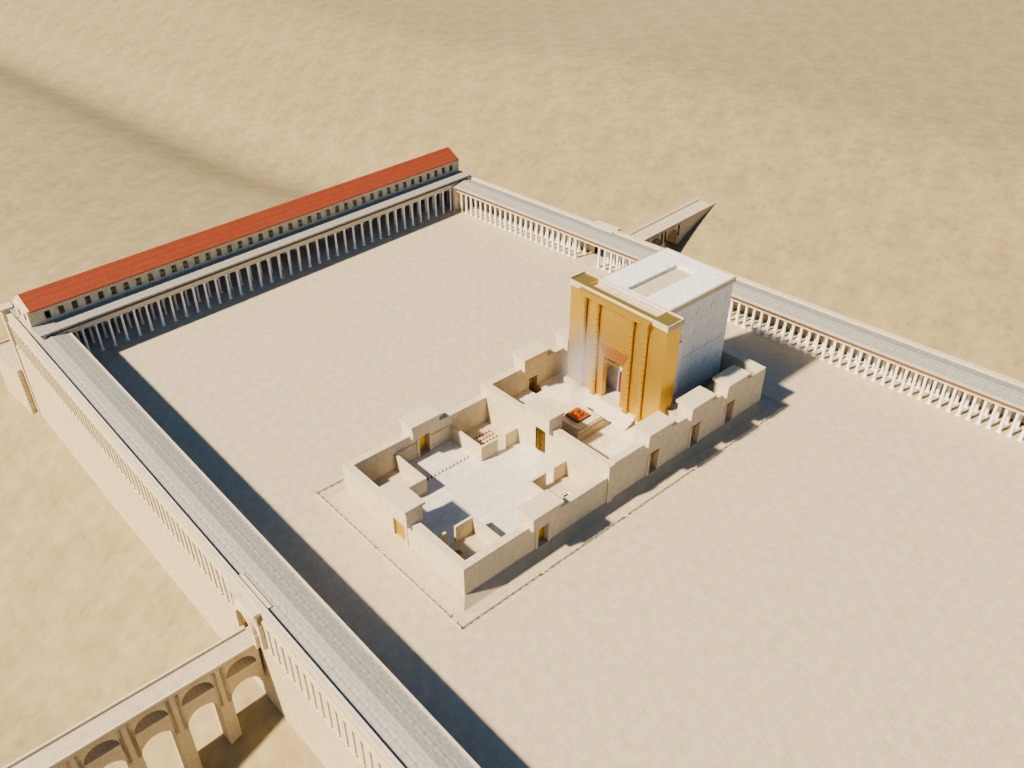
Blender Temple render, looking at the whole Temple complex from the northeast.
The Blender version is brighter and clearer, with better shadows and reflectivity.
HTML Temple render, looking at the whole Temple complex from the northeast.
The HTML version is murkier.
Blender Temple render, looking at the central sanctuary area from the southeast.
Again, the Blender version feels more realistic.
HTML Temple render, looking at the central sanctuary area from the southeast.
I do like the fire in the HTML version better, though.

Posted in Code, Geo, History, Virtual Reality

Clauding an Interactive 3D Model of Herod's Temple

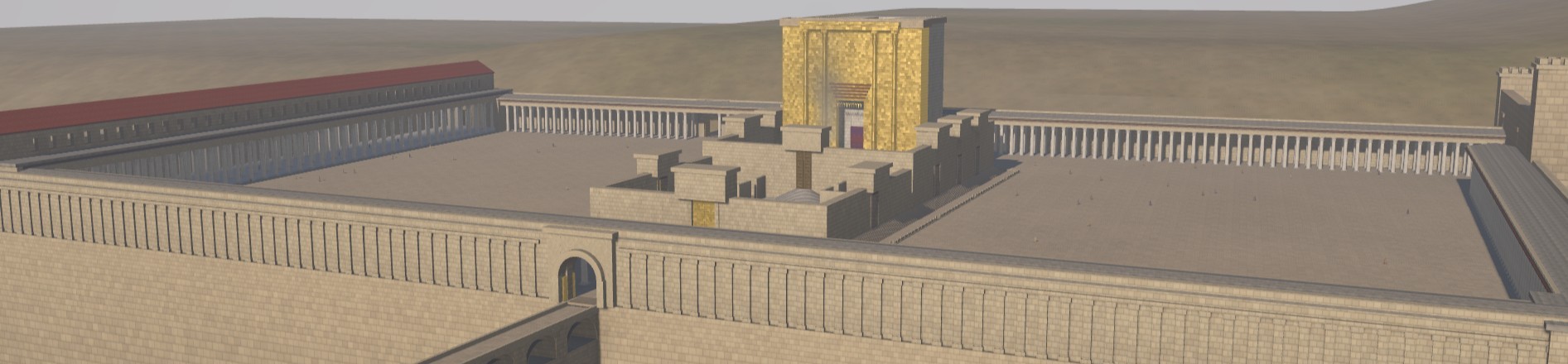
In the announcement for Opus 5, Anthropic demoed an interactive visualization of a car in a wind tunnel. Clearly the next logical question is: can Opus 5 build an interactive visualization of Herod’s Temple complex in Jerusalem during the time of Christ?

Yes, it can. Try the interactive 3D model of Herod’s Temple it made and grab the source code to improve it.

My prompt was simple, just asking it to build a historically accurate, interactive, 3D reconstruction of the Temple. It created the model and added the interactive tour elements itself. It took about twelve hours of computate time over 25 revisions to repair geometry and (my favorite) animate the fire/smoke effect. It came up on its own with the idea of letting you change the time of day. The code is well beyond my ability and desire to understand. My revisions were mostly variations on saying, “This looks wrong. Fix it,” which is how we debug in July 2026.

The model is probably wrong on some details, though Claude argued eloquently for why it was right and scholars were wrong (such as the orientation of the steps from the plaza into the Antonia Fortress in the northwest and the existence of a causeway across the Kidron). The beauty of using an LLM and open-sourcing the code is that you can just feed it new research papers as they’re published and ask it to apply the findings to the model.

It also includes views of New Testament events that happened at the Temple, together with verse references. Claude’s text is rife with its aggressively precise tone (“Every arch ring needs its spandrel”), and I didn’t review every word it wrote. It also enjoys narrating its whole journey of discovery in code comments.

Some views:

Temple render at 9am.
A morning view from the east captures the gold reflection in the morning sun.
A render from above shows the Court of the Women, the altar, and the sanctuary.
The central Temple area.
An overhead view of the altar area, taken at simulated evening.
The glow from the altar in the evening shows off the lighting.

Try it or fork it.

Posted in Code, Geo, History, Virtual Reality

Last Week, an LLM Out-Programmed Me

With last week’s release of Codex 5.3 and Opus 4.6, I had a new experience: an LLM showed itself to be a better programmer than I am. If you’ve seen my code, you may not think that’s a big achievement. But for the first time I saw, practically, how an AI could outperform me at something I take some measure of pride in. It was like Google’s Nano Banana Pro moment, but for coding.

Unlike my previous experiences with LLM coding, Codex 5.3 didn’t just have more familiarity with the syntax of a language or the functionality of a module; it solved an architectural problem better than I did. (It reused existing file artifacts instead of creating intermediate files.) Likely it had pulled the architectural pattern from somewhere else, but it was an elegant solution—superior to the workable-but-basic approach I’d been planning. In that instant, I felt like the future had arrived in a small way: it was better at this task than I was, not just faster at it.

LLMs have let me compress weeks of coding work into a few days. For the Bible Passage Reference Parser, I normally follow a six-month release schedule because changes take a lot of time, especially big refactoring changes like I’ve been planning for the next version (which moves language data to a different repo and adds an additional 2,000 languages). I’d been dreading this work for years because, with so many languages, dealing with exceptions would consume the bulk of the coding effort. I could barely manage exceptions with the 40 languages in the current repo, so adding 50x more didn’t sound fun.

However, Codex 5.3 made short work of the task, taking a few minutes to accomplish what would’ve taken me days of dedicated work, not that I’d ever be able to dedicate days straight to this project. I published the latest branch five months ahead of schedule (and remember, the schedule is six months long).

These models still make mistakes; you can’t yet let them code unattended. But their ability to plan ahead and write code according to that plan is now (at least sometimes) stronger than mine. A year ago, converting the reference-parser code from Coffeescript to Typescript involved a bunch of back-and-forth with ChatGPT; even with a straight 1:1 conversion, it still made questionable decisions that I corrected. With the latest models, LLMs are now correcting my questionable decisions.

Posted in AI, Code

Bible Reference Parser Code Update

The semiannual release schedule of the Javascript Bible Passage Reference Parser continues. This release:

  • Improves support for parentheses.
  • Adds some alternate versification systems.
  • Supports French book names.
  • Removes the "docs" folder because it was getting unwieldy; the source itself remains commented.
  • Reorganizes some of the source code.
  • Increases the number of real-world strings from 200,000 to 370,000. I ran the parser on all 85 million tweets and Facebook posts in the Realtime Bible Search database to produce the list.

One of the main goals of this parser is to give you a starting point to build your own parser, so the source is thoroughly documented and has many tests you can use to validate your code.

Try a demo or browse the source on GitHub.

Posted in Code

A Javascript Bible Passage Reference Parser

Browse the Github repository of a new Bible-reference parser written in Coffeescript / Javascript (it understands text like “John 3:16”), try a demo, or review the annotated source. You can use the parser as-is or as a starting point for building your own–the source code includes 200,000 real-world passage references to give you a head start. It’s designed to handle how people actually type Bible references (typos and all) and tries hard to make sense of any input you give it.

From the readme:

This is the fourth complete Bible reference parser that I've written. It's how I try out new programming languages: the first one was in PHP (2002), which saw production usage on a Bible search website from 2002-2011; the second in Perl (2007), which saw production usage on a Bible-related site starting in 2007; and the third in Ruby (2009), which never saw production usage because it was way too slow. This Coffeescript parser (at least on V8) is faster than the Perl one and 100 times faster than the Ruby one.

I chose Coffeescript out of curiosity–does it make Javascript that much more pleasant to work with? From a programming perspective, the easy loops and array comprehensions alone practically justify its use. From a readability perspective, the code is easier to follow (and come back to months later) than the equivalent Javascript–the tests, in particular, are much easier to follow without all the Javascript punctuation.

My main interest in open-sourcing and thoroughly documenting this code lies in giving future programmers data and code that they can use to build better parsers. While this code reflects my experience, it’s hardly the last word on the subject.

Posted in Code